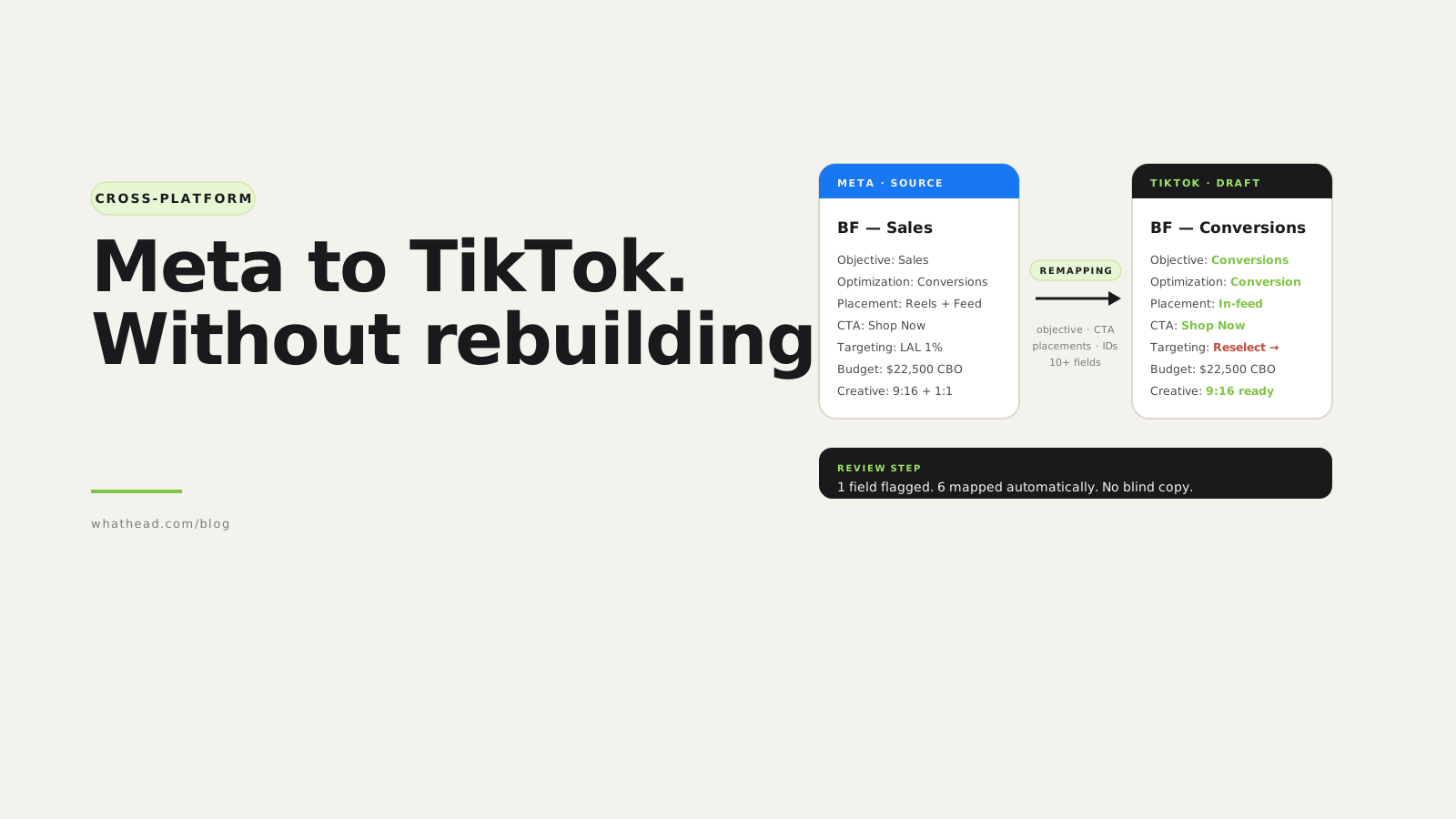
- Definition Cross-platform campaign transfer
- Cross-platform campaign transfer is the process of reusing a campaign structure from one ad platform on another while translating platform-specific fields and removing settings that do not apply to the destination.
Performance teams rarely launch in one channel anymore. A campaign that works on Meta often needs a TikTok version, a Snap version, an X version, and a LinkedIn or Google version.
The slow part is not the idea. It is rebuilding the same structure, re-uploading assets, retyping links, and remembering which settings do not exist on the destination platform.
Whathead treats cross-platform launch as mapping, not copy-paste. It helps preserve the campaign logic while translating the fields that need to change.
Copying a campaign vs translating it
Blind copy
Fast but messy- Carries old objective assumptions
- Keeps unsupported CTAs or placements
- Requires manual cleanup later
Whathead transfer
Mapped and reviewable- Objective and CTA translated
- Creative reused where valid
- Destination-specific QA before launch
What this looks like in the workspace
- Objective mapping
Translate reach, traffic, sales, app, engagement, and follower logic by platform.
- CTA and placement cleanup
Remove values that do not exist or should not apply on the target channel.
- Creative reuse
Carry approved assets forward without recreating media work manually.
From messy request to controlled publish
- 01Choose sourcePick the campaign or ad set
- 02Choose targetSelect destination platform/campaign
- 03MapTranslate objectives and fields
- 04CleanRemove incompatible settings
- 05ReviewPublish only after QA
What must change during transfer
- Optimization goals tied to the source objective
- Pixel, app, or conversion fields that do not belong to the destination objective
- Placements and CTAs that are named differently or unsupported
- Creative formats that pass in one platform but fail in another
The brief can be the same across platforms. The payload cannot.
You can test the same operating model inside Whathead: transfer campaigns across platforms, then validate the mapped objective, placements, copy, and tracking before launch.
Copying isn't mapping
What can go wrong
Blind copy
- Carry Meta objective into TikTok payload
- Keep optimization goal that no longer applies
- Reuse interest IDs that don't exist on the destination
- Send invalid placement names
- Fail validation or — worse — launch wrong
Mapped transfer
- Translate objective to the destination taxonomy
- Reset dependent fields when objective changes
- Flag platform-specific targeting for reselection
- Map placements + CTAs to valid values
- Flag missing creative, leave human review where needed
What usually transfers cleanly
These fields describe the marketing plan — they move across platforms with no special handling:
- Campaign name or naming pattern
- Funnel stage
- Market
- Budget intent
- Flight dates
- Audience concept
- Creative concept
- Landing page + UTM strategy + reporting labels
What needs remapping
Fields that need translation between platforms
| Why it needs mapping | |
|---|---|
| Objective | Platforms use different objective taxonomies |
| Optimization goal | Valid values depend on platform and objective |
| Bid strategy | Automatic / max / target / cost cap rules differ |
| Billing event | Impression, click, view, engagement, conversion rules differ |
| Placement | Feeds, stories, reels, search, networks vary |
| CTA | Allowed labels and CTA types differ by platform |
| Targeting | IDs and targeting categories are platform-specific |
| Creative format | Aspect ratio, duration, media object rules differ |
| Budget level | Campaign vs ad set budget support varies |
| Conversion fields | Pixels, apps, events, tags are platform-specific |
Objective mapping guide
Start with business intent, then translate to the destination platform's closest match:
| Common destination interpretation | |
|---|---|
| Awareness | Reach, impressions, video views, brand awareness |
| Traffic | Website clicks, landing page views, visits |
| Engagement | Post engagement, video engagement, profile engagement |
| Leads | Lead generation, form submission, conversion lead |
| Sales | Conversions, purchases, catalog sales |
| App promotion | App installs, app events, retargeting |
Placement mapping guide
- Meta Stories and Reels may map to TikTok in-feed or Snap full-screen vertical
- Feed placements may map to X timeline or LinkedIn feed
- Search placements may not exist on social platforms
- Audience Network may have no useful equivalent
CTA mapping guide
| Possible platform labels | |
|---|---|
| Learn more | Learn More |
| Shop | Shop Now |
| Sign up | Sign Up |
| Download | Download, Install |
| Apply | Apply Now |
| Watch | Watch More, Watch Now |
Targeting transfer
- Locations (country / region / city)
- Age ranges
- Gender
- Language
- Device targeting
- Interest IDs (platform-specific)
- Custom audiences (account-bound)
- Lookalike seeds
- Keyword lists (search platforms)
- Follower / handle targeting
- Preserve high-level audience intent
- Transfer universal fields where possible
- Flag platform-specific IDs for reselection
- Avoid pretending one platform's interest ID exists on another
Creative transfer
Creative transfer depends on asset availability and platform rules.
- Is the asset uploaded to the destination platform?
- Does the destination support the format?
- Does the ad need an existing post, card, Spark authorization, or media ID?
- Is a 9:16, 1:1, 4:5, or 16:9 version available?
Transfer QA checklist
- Destination platform and account are correct
- Campaign objective has been mapped intentionally
- Optimization goal is valid for the new objective
- Bid strategy and bid amount are compatible
- Budget level is supported
- Placements exist on the destination platform
- CTA is valid
- Targeting fields are valid (not stale source-platform IDs)
- Pixel / app / conversion fields valid for the destination
- Creative assets are uploaded or selectable
- Existing post IDs are reused only when intended
- Naming and UTMs still match reporting rules
Frequently asked questions
Can I copy a Meta campaign directly to TikTok?
You can reuse the structure — but the setup needs mapping. Objective, optimization, placements, targeting, creative, and conversion fields may all need to change.
What is the biggest risk in cross-platform transfer?
Carrying stale platform-specific fields into the destination — old optimization goals, conversion events, targeting IDs, or creative references that don't apply to the new platform.
Should targeting transfer automatically?
Universal fields can often transfer. Platform-specific audiences and interest IDs should be reviewed or reselected.
Is cross-platform transfer useful for agencies?
Yes. Agencies often reuse campaign structures across clients, markets, or platforms.
How much does Whathead cost?
$20/month flat, all 8 ad platforms included. 14-day free trial, no credit card.
Written by the Whathead team. We build the operational workspace for paid media teams across Meta, TikTok, Snapchat, Reddit, LinkedIn, Google, and X. Last reviewed May 16, 2026.