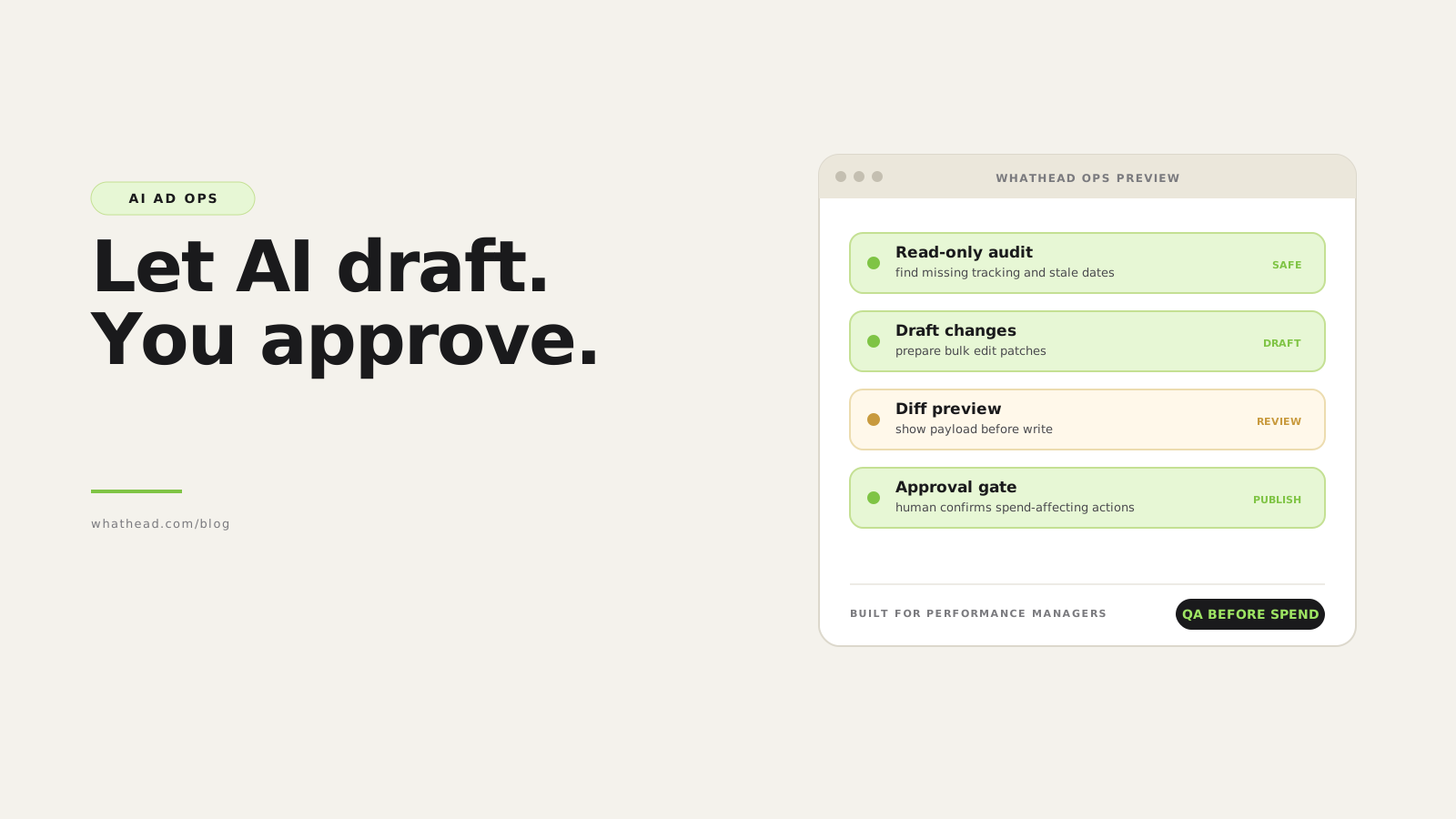
- Definition AI ad operations agent
- An AI ad operations agent is an assistant connected to structured ad account tools. It can inspect campaign state, answer operational questions, draft changes, and support launch workflows under permissions and approval controls.
AI in paid media is often discussed as copy generation. That is the least interesting part.
The real leverage is operational: reading campaign structures, finding broken setups, comparing performance, creating QA lists, preparing bulk edit patches, and turning a media plan into draft campaign entities.
Whathead gives agents access to structured tools through MCP, so they can help with real ad operations without bypassing the human review layer.
Prompting AI vs operating with AI
Prompt-only AI
Helpful but detached- Works from pasted screenshots
- Cannot verify platform state
- No controlled write path
Whathead agents
Connected and governed- Read real campaign data
- Draft safe structured changes
- Require approval for writes
What this looks like in the workspace
- Campaign audits
Ask the agent to find risk, missing tracking, spend anomalies, and inconsistent settings.
- Bulk edit drafts
Let AI prepare the patch while Whathead validates it before publish.
- Performance summaries
Turn campaign state and metrics into actionable operator notes.
From messy request to controlled publish
- 01ConnectGive the agent scoped Whathead tools
- 02ReadInspect live account structure
- 03ReasonSummarize risks and opportunities
- 04DraftPrepare changes or launch structure
- 05ApproveHuman confirms writes
Good AI agent boundaries
- Read access is not the same as write access
- Every write should have validation and review
- Actions should leave logs that a team can inspect
- Agents should work with platform rules, not free-text payload guesses
The best AI ad operator does not own the budget. It owns the repetitive analysis and setup work you already know how to approve.
Whathead gives AI agents a controlled operating layer: MCP tools for account reads, structured change drafts, approval, logs, and safer campaign actions.
Why generic AI is not enough
A generic assistant can explain campaign concepts, but it cannot safely operate your ad accounts unless it has structured tools, permissions, validation, and audit logs.
- Screenshots do not expose full campaign state
- Free-text instructions are not safe API payloads
- Platform rules change by objective and product type
- Bulk edits need validation before writing
- The team needs logs, not vibes
| Platform | Task | Output | Status |
|---|---|---|---|
 Meta Meta | Audit lead-gen campaigns | 8 warnings | Review |
 TikTok TikTok | Draft Spark Ads plan | 6 ads staged | Draft |
 X X | Check post reuse | 2 new posts needed | Ready |
 Google Google | Summarize search spend | Report ready | Ready |
AI work should become reviewable tasks, not invisible platform changes.
What AI agents should do in paid media
- AuditFind missing tracking, stale dates, budget anomalies, and invalid objective settings.
- ExplainSummarize what changed, what is risky, and what needs approval.
- DraftCreate campaign structures, ad copy variants, and bulk edit patches as drafts.
- ValidateCheck fields against platform and objective rules before writing.
- ReportTurn platform data into concise daily or weekly performance narratives.
A safe AI ad operations architecture
The architecture matters more than the model. Give the model structured tools, limited scopes, validation, and explicit approvals.
- Read tools for campaign/account inspection
- Draft tools for proposed campaign structures
- Validation tools for platform-specific rules
- Write tools gated behind user approval
- Action logs with request IDs and payload summaries
- Undo or rollback where the platform allows it
How to roll out AI ad operations safely
| Mode | Allowed actions | Risk | |
|---|---|---|---|
| Read-only | Fetch campaigns, summarize, audit | Low | |
| Draft | Create campaign drafts and proposed edits | Medium | |
| Approve-to-write | Publish after human approval | Controlled | |
| Autonomous write | Change live spend without review | Avoid for most teams |
How to start using AI for ad operations safely
A staged rollout for AI audits, drafts, reporting, and controlled publish workflows.
⏱ About 25 minutes
- 01
Start read-only
Ask the agent to summarize campaigns, spot anomalies, and explain risks without changing anything.
- 02
Add draft workflows
Let the agent prepare media-plan imports, campaign structures, or bulk edit proposals.
- 03
Require diff previews
Show what would change before any write action.
- 04
Gate writes behind approval
Only publish after a human reviews the diff and confirms the action.
- 05
Log every action
Store the prompt, tool call, payload summary, result, and request ID.
Good prompts for AI ad operations
Useful prompts are specific about account, date range, platform, entity level, and desired output.
- Audit all active campaigns for missing tracking
- Draft budget increases for ad sets below target CPA
- Summarize yesterday spend changes by platform
- Prepare a launch QA checklist for this campaign tree
Where AI should not be trusted blindly
AI should not decide spend changes alone when business context, budget approval, legal review, or brand safety matters.
- Large budget moves
- Compliance-sensitive copy
- Audience exclusions
- Deletion or irreversible platform actions
AI ad operations safety checklist
Use this before giving an AI assistant write-capable tools.
- Tool schemas are typed
- Permissions are scoped by account and platform
- Read and write actions are separated
- Write actions require approval
- Every action is logged
- Validation runs before publish
- Rollback plan is documented
Frequently asked questions
Can AI manage paid media campaigns?
AI can assist with audits, drafts, reporting, and controlled updates. For most teams, spend-affecting writes should still require human approval.
What is MCP for ad operations?
MCP lets AI assistants call structured tools, such as fetching campaigns or drafting updates, instead of relying on screenshots or free-text instructions.
What is the safest first AI workflow?
Read-only campaign audits are the safest starting point because they create value without changing live spend.
Should AI agents have admin ad account access?
Usually no. Give scoped permissions and use approval gates for write actions.
Written by the Whathead team. We build the operational workspace for paid media teams across Meta, TikTok, Snapchat, Reddit, LinkedIn, Google, and X. Last reviewed May 16, 2026.